---
title: What is Databeat Doorsign?
description: Databeat Doorsign is a digital signage solution designed for touch booking and displaying meeting room schedules and information outside of conference rooms, offices, and other resources with a Microsoft 365, Exchange, or Google Workspace calendar.
---
[Skip to content](https://support.databeat.net/en/what-is-databeat-doorsign#main-content)
- [English](https://support.databeat.net/en/what-is-databeat-doorsign)
- [Norsk – Norge](https://support.databeat.net/no-no/hva-er-databeat-doorsign)
English
Show submenu for translations

Open main navigation
Close main navigation
- - [English](https://support.databeat.net/en/what-is-databeat-doorsign)
- [Norsk – Norge](https://support.databeat.net/no-no/hva-er-databeat-doorsign)
English
Show submenu for translations
- Contact us
Contact us
Knowledge base
- There are no suggestions because the search field is empty.
1. [Databeat Knowledge base](https://support.databeat.net/en?hsLang=en)
2. [Databeat Doorsign](https://support.databeat.net/en/databeat-doorsign?hsLang=en)
3. [Getting Started](https://support.databeat.net/en/databeat-doorsign?hsLang=en#getting-started)
# What is Databeat Doorsign?
## Databeat Doorsign is a digital signage solution designed for touch booking and displaying meeting room schedules and information outside of conference rooms, offices, and other resources with a Microsoft 365, Exchange, or Google Workspace calendar.
#### Databeat Doorsign makes it simple to display updated calendar information from Microsoft 365, Microsoft Exchange, or Google Workspace in a secure way.
Databeat Doorsign is a cloud-based digital signage solution designed for displaying meeting room schedules and other important information outside of conference rooms, offices, and other facilities. It allows you to create custom digital signs that display real-time information about upcoming meetings, room availability, and other relevant information, all in an easy-to-read format.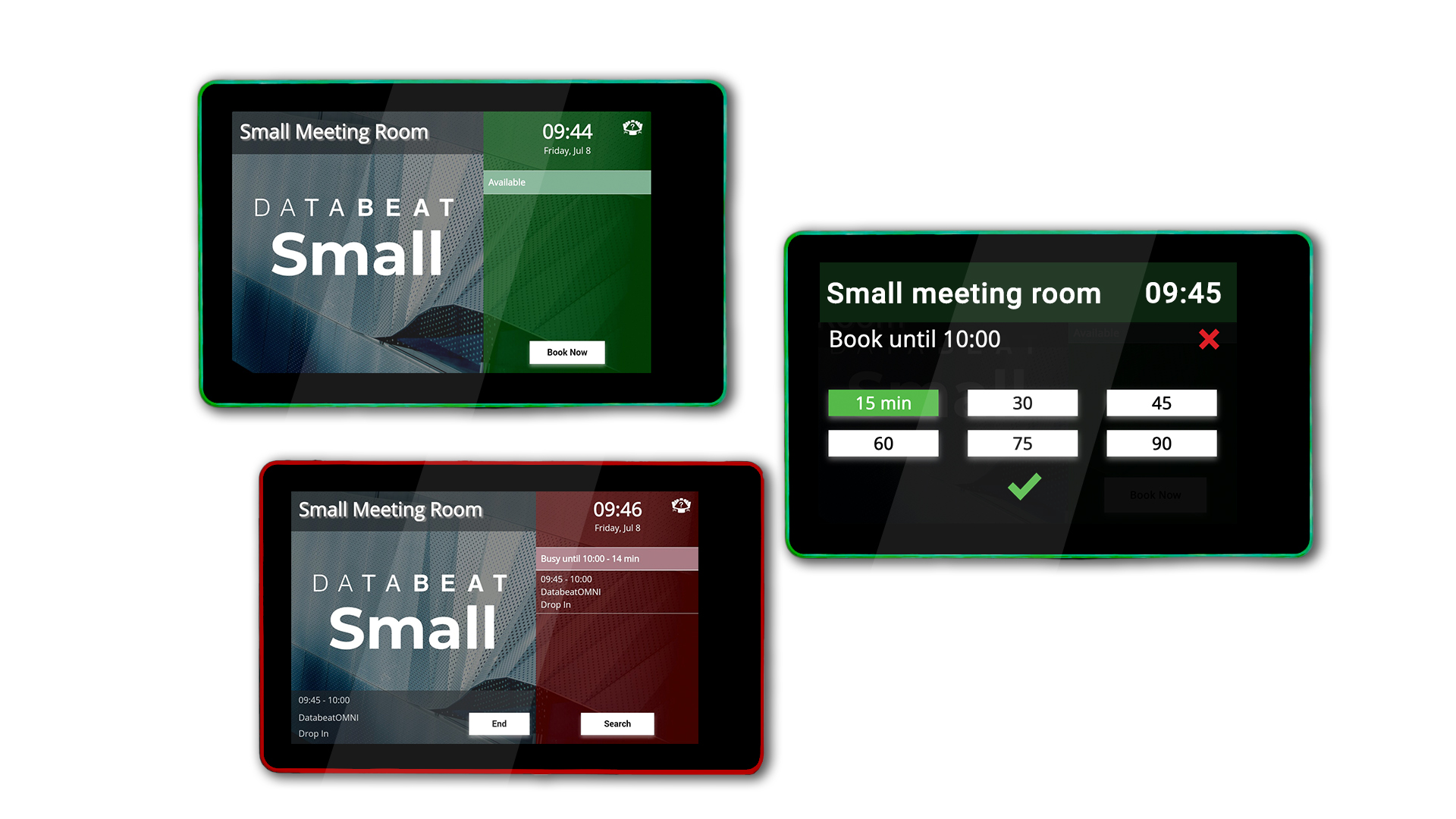
One of the key features of Databeat Doorsign is its flexibility. The system supports a wide range of devices, including tablets, smart TVs, and of course professional digital signage displays, making it easy to deploy in a variety of settings.
It's also fully customizable, with a range of templates, themes, and branding options that allow you to create a look and feel that's consistent with your organization's visual identity.
#### Here are some of the key features and benefits of Databeat Doorsign:
1. **Real-time updates:** Databeat Doorsign pulls information directly from your organization's calendar system, so the information displayed on the signs is always up-to-date and accurate.
2. **Customizable designs:** With a range of templates, themes, and branding options, you can create signs that match your organization's visual identity and are easy to read and understand.
3. **Easy deployment:** Databeat Doorsign works with a range of devices and operating systems, making it easy to deploy in a variety of settings.
4. **Improved communication:** By displaying real-time meeting room schedules and availability, Databeat Doorsign helps to improve communication and reduce confusion around scheduling and room availability.
5. **Increased productivity:** With clear, easy-to-read signs that provide real-time information about meeting schedules and room availability, employees can quickly and easily find the information they need, reducing the time spent looking for available rooms and increasing productivity.
### Touch Booking with Databeat Doorsign
With touchscreens, a drop-in function can be utilized and users can book a room or resource in a matter of a few clicks on the doorsign screen. Some devices even support RGB lights on the sides of the panel, indicating whether a room or resource is vacant (green) or occupied (red), making it easier to check the current status of the room or resource from any angle.
[Check out the recommended Databeat Doorsign Displays and hardware Specs here.](https://support.databeat.net/en/hardware-specs-for-databeat-doorsign?hsLang=en)
### Not just meeting room calendars
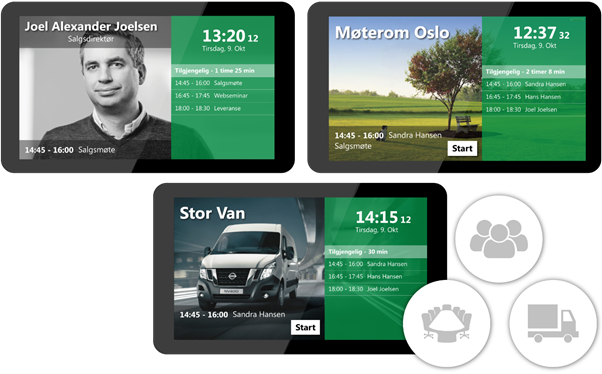
Create digital door signs for meeting rooms, employees, or other resources – and publish your own background pictures or video to customize the door signs for your organization.
### **One platform to rule them all**
**Databeat Doorsign** runs on the powerful platform [**DatabeatOMNI**](https://www.databeat.net/en/databeatomni?hsLang=en), which allows you to effortlessly manage all your Doorsigns and digital signage displays in one solution.
Along with a range of complementary products, like [**Databeat Signage**](https://www.databeat.net/en/databeatsignage?hsLang=en), and features, such as Microsoft or Google third-party authentication for a user-friendly and secure single sign-on (SSO), we strive to fulfill all your Digital Signage needs.
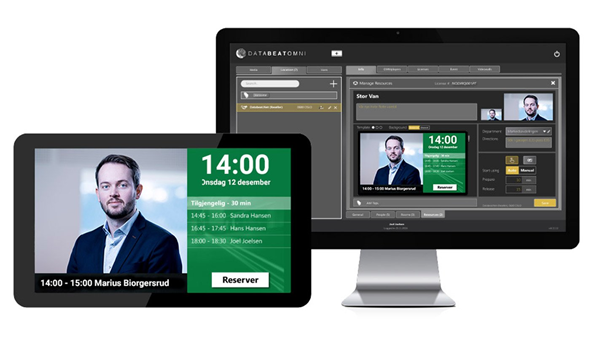
Overall, Databeat Doorsign a is powerful digital signage solution that can help organizations of all sizes improve communication, reduce confusion, and increase productivity in their workplaces.
With its flexible design, real-time updates, and easy deployment, it's a great choice for any organization looking to improve their meeting room scheduling processes and provide clear, easy-to-understand information to employees and visitors.
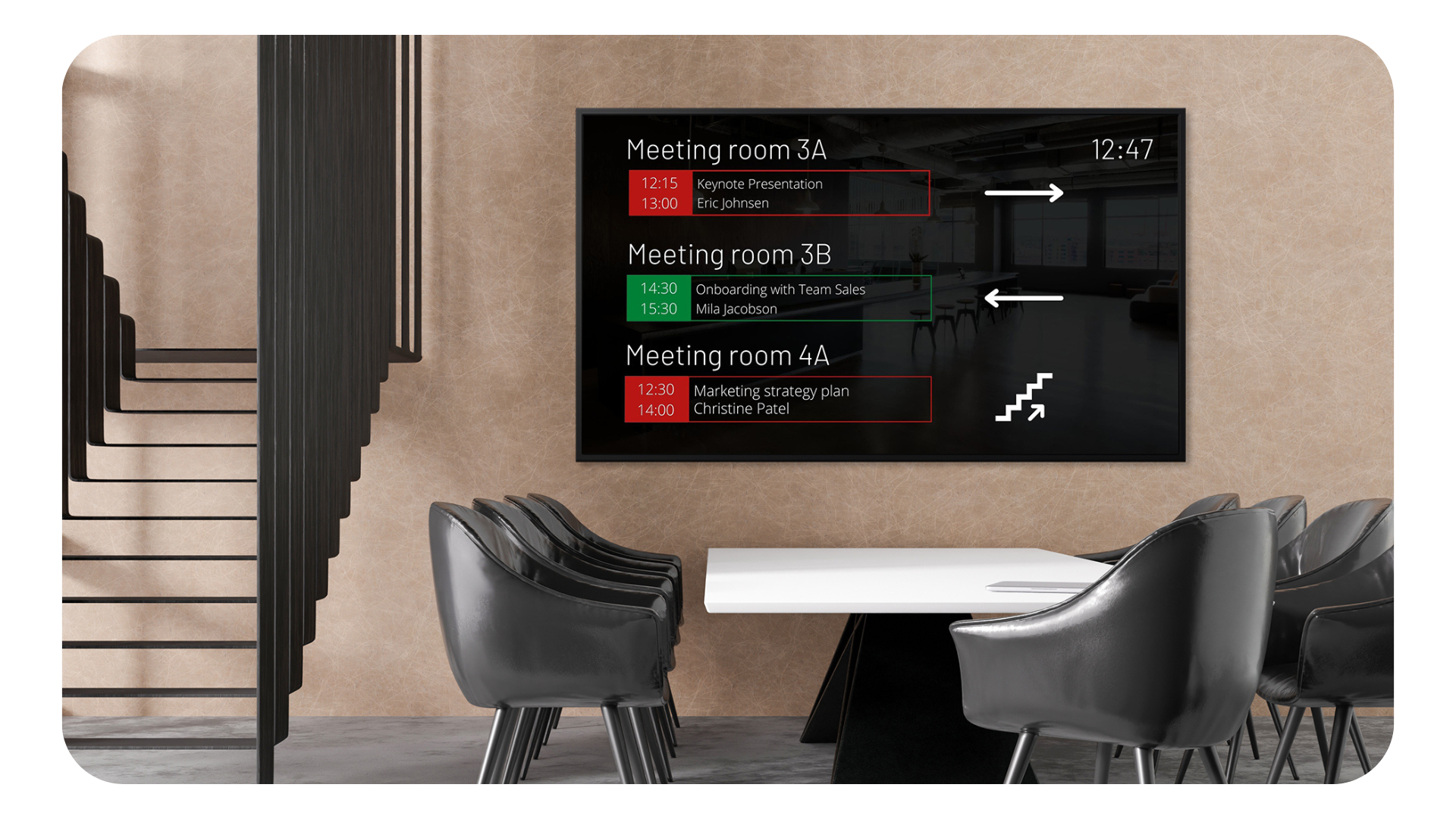
**Looking for a multi-tenant calendar Booking Solution to accompany your Doorsigns?**Please check [Databeat Booking](https://www.databeat.net/en/databeatbooking?hsLang=en) and learn how Databeat Signage, Doorsign, and Booking can work together to allow other tenants to book your meeting rooms.
### **How to start using Databeat Doorsign**
[You can contact us or learn more here](https://www.databeat.net/en/doorsign?hsLang=en), [book a demo](https://www.databeat.net/en/request-a-live-demo-of-databeatomni?hsLang=en), or follow the steps to try it yourself:
1. **Prepare your calendar application** to enable integration with DatabeatOMNI. In your calendar application, you can manage *who* (employees) and *which* (room or resource) is registered and for which of these you want a doorsign ([See how](https://support.databeat.net/how-to-set-up-office365-calendars-in-databeatomni?hsLang=en))
2. **Connect DatabeatOMNI** with Microsoft 365 in the Doorsign module and the chosen rooms, people, and resources, is displayed immediately ([See how](https://support.databeat.net/connect-databeat-doorsign-to-office-365-or-microsoft-exchange?hsLang=en))
3. **Chooose the resource** you wish to set up on the doorsign and immediately see how it will be displayed on the screen
4. **Upload** a simple picture or create your own channel (with pictures and video) to be displayed in the background on the doorsign screen
- [Databeat Signage](https://support.databeat.net/en/databeat-signage?hsLang=en#main-content)
- [FAQ](https://support.databeat.net/en/databeat-signage?hsLang=en#faq)
- [Getting Started](https://support.databeat.net/en/databeat-signage?hsLang=en#getting-started)
- [Media](https://support.databeat.net/en/databeat-signage?hsLang=en#media)
- [Locations](https://support.databeat.net/en/databeat-signage?hsLang=en#locations)
- [Users](https://support.databeat.net/en/databeat-signage?hsLang=en#users)
- [Screen Designer](https://support.databeat.net/en/databeat-signage?hsLang=en#screen-designer)
- [Other](https://support.databeat.net/en/databeat-signage?hsLang=en#other)
- [Databeat Doorsign](https://support.databeat.net/en/databeat-doorsign?hsLang=en#main-content)
- [Getting Started](https://support.databeat.net/en/databeat-doorsign?hsLang=en#getting-started)
- [Setup & Configure](https://support.databeat.net/en/databeat-doorsign?hsLang=en#setup-configure)
- [Databeat Overview](https://support.databeat.net/en/databeat-doorsign?hsLang=en#databeat-overview)
- [Microsoft 365](https://support.databeat.net/en/databeat-doorsign?hsLang=en#microsoft-365)
- [Google Workspace](https://support.databeat.net/en/databeat-doorsign?hsLang=en#google-workspace)
- [Templates and design](https://support.databeat.net/en/databeat-doorsign?hsLang=en#templates-and-design)
- [Troubleshooting](https://support.databeat.net/en/databeat-doorsign?hsLang=en#troubleshooting)
- [FAQ](https://support.databeat.net/en/databeat-doorsign?hsLang=en#faq)
- [Databeat Booking](https://support.databeat.net/en/databeat-booking?hsLang=en#main-content)
- [FAQ](https://support.databeat.net/en/databeat-booking?hsLang=en#faq)
- [Getting started](https://support.databeat.net/en/databeat-booking?hsLang=en#getting-started)
- [Troubleshoot](https://support.databeat.net/en/databeat-booking?hsLang=en#troubleshoot)
- [DatabeatOMNI](https://support.databeat.net/en/databeatomni?hsLang=en#main-content)
- [About DatabeatOMNI](https://support.databeat.net/en/databeatomni?hsLang=en#about-databeatomni)
- [OMNIplayer](https://support.databeat.net/en/databeatomni?hsLang=en#omniplayer)
- [Databeat Server](https://support.databeat.net/en/databeatomni?hsLang=en#databeat-server)
- [OMNIplay](https://support.databeat.net/en/omniplay?hsLang=en#main-content)
- [About OMNIplay](https://support.databeat.net/en/omniplay?hsLang=en#about-omniplay)
- [Install & configure](https://support.databeat.net/en/omniplay?hsLang=en#install-configure)
- [Network](https://support.databeat.net/en/omniplay?hsLang=en#network)
- [License key](https://support.databeat.net/en/omniplay?hsLang=en#license-key)
- [Remote control](https://support.databeat.net/en/omniplay?hsLang=en#remote-control)
- [Troubleshooting](https://support.databeat.net/en/omniplay?hsLang=en#troubleshooting)
- [OMNIcast](https://support.databeat.net/en/omnicast?hsLang=en#main-content)
- [About OMNIcast](https://support.databeat.net/en/omnicast?hsLang=en#about-omnicast)
- [Setup & configure](https://support.databeat.net/en/omnicast?hsLang=en#setup-configure)
- [Install](https://support.databeat.net/en/omnicast?hsLang=en#install)
- [Integrations](https://support.databeat.net/en/integrations?hsLang=en#main-content)
- [PowerPoint Publisher](https://support.databeat.net/en/integrations?hsLang=en#powerpoint-publisher)
- [Power BI](https://support.databeat.net/en/integrations?hsLang=en#power-bi)
- [Webpages](https://support.databeat.net/en/integrations?hsLang=en#webpages)
- [Microsoft](https://support.databeat.net/en/integrations?hsLang=en#microsoft)
- [Subscription & Billing](https://support.databeat.net/en/subscription-billing?hsLang=en#main-content)
- [OMNIstore](https://support.databeat.net/en/subscription-billing?hsLang=en#omnistore)
- [Products & Prices](https://support.databeat.net/en/subscription-billing?hsLang=en#products-prices)
- [Subscription](https://support.databeat.net/en/subscription-billing?hsLang=en#subscription)
- [Databeat Hardware](https://support.databeat.net/en/databeat-hardware?hsLang=en#main-content)
- [OMNIplay3](https://support.databeat.net/en/databeat-hardware?hsLang=en#omniplay3)
- [OMNIplay4](https://support.databeat.net/en/databeat-hardware?hsLang=en#omniplay4)
- [OMNIplay3v7](https://support.databeat.net/en/databeat-hardware?hsLang=en#omniplay3v7)
- [DS10 / DS10+](https://support.databeat.net/en/databeat-hardware?hsLang=en#ds10-ds10)
- [DS13 / DS13+](https://support.databeat.net/en/databeat-hardware?hsLang=en#ds13-ds13)
- [T22 / T22BR](https://support.databeat.net/en/databeat-hardware?hsLang=en#t22-t22br)
- [OMNIpower](https://support.databeat.net/en/databeat-hardware?hsLang=en#omnipower)
- [Samsung](https://support.databeat.net/en/samsung?hsLang=en#main-content)
- [OMNIplay for Samsung](https://support.databeat.net/en/samsung?hsLang=en#omniplay-for-samsung)
- [Install](https://support.databeat.net/en/samsung?hsLang=en#install)
- [Troubleshoot](https://support.databeat.net/en/samsung?hsLang=en#troubleshoot)
- [Factory reset](https://support.databeat.net/en/samsung?hsLang=en#factory-reset)
- [Uninstall](https://support.databeat.net/en/samsung?hsLang=en#uninstall)
- [LG](https://support.databeat.net/en/lg?hsLang=en#main-content)
- [OMNIplay for LG](https://support.databeat.net/en/lg?hsLang=en#omniplay-for-lg)
- [Install](https://support.databeat.net/en/lg?hsLang=en#install)
- [Troubleshoot](https://support.databeat.net/en/lg?hsLang=en#troubleshoot)
- [Factory reset](https://support.databeat.net/en/lg?hsLang=en#factory-reset)
- [Philips](https://support.databeat.net/en/philips?hsLang=en#main-content)
- [Install](https://support.databeat.net/en/philips?hsLang=en#install)
- [Troubleshoot](https://support.databeat.net/en/philips?hsLang=en#troubleshoot)
- [Factory reset](https://support.databeat.net/en/philips?hsLang=en#factory-reset)
- [Windows](https://support.databeat.net/en/windows?hsLang=en#main-content)
- [Install](https://support.databeat.net/en/windows?hsLang=en#install)
- [Troubleshoot](https://support.databeat.net/en/windows?hsLang=en#troubleshoot)
- [Android](https://support.databeat.net/en/android?hsLang=en#main-content)
- [OMNIplay for Android](https://support.databeat.net/en/android?hsLang=en#omniplay-for-android)
- [Troubleshoot](https://support.databeat.net/en/android?hsLang=en#troubleshoot)
- [AOPEN](https://support.databeat.net/en/aopen?hsLang=en#main-content)
- [Install](https://support.databeat.net/en/aopen?hsLang=en#install)
- [Hisense](https://support.databeat.net/en/hisense?hsLang=en#main-content)
- [Install](https://support.databeat.net/en/hisense?hsLang=en#install)
- [Factory reset](https://support.databeat.net/en/hisense?hsLang=en#factory-reset)
- [Qbic](https://support.databeat.net/en/qbic?hsLang=en#main-content)
- [Install](https://support.databeat.net/en/qbic?hsLang=en#install)
- [GoaliveTV](https://support.databeat.net/en/goalivetv?hsLang=en)
- [Vestel](https://support.databeat.net/en/vestel?hsLang=en#main-content)
- [Install](https://support.databeat.net/en/vestel?hsLang=en#install)
- [Firmware upgrade](https://support.databeat.net/en/vestel?hsLang=en#firmware-upgrade)
- [Databeat Resource Scheduling](https://support.databeat.net/en/databeat-resource-scheduling?hsLang=en#main-content)
- [Databeat Booking Hub](https://support.databeat.net/en/databeat-resource-scheduling?hsLang=en#databeat-booking-hub)
[](https://support.databeat.net?hsLang=en)
Databeat Knowledge base
Copyright © 2026, PLAYipp Norge AS